[Spring] 스프링 프로젝트 기본 환경 세팅(pom.xml, web.xml.. 등등)

스프링 프로젝트의 기본적인 환경 세팅을 해보겠습니다.
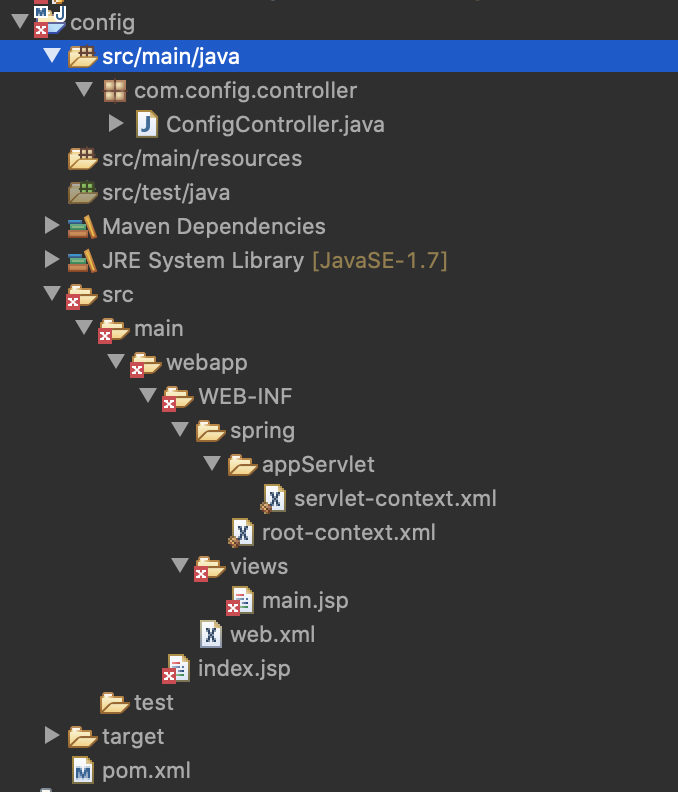
우선 전체적인 프로젝트구조를 보고 시작하겠습니다. 예시프로젝트로 config라는 메이븐프로젝트를 생성하였습니다.
아래 이미지는 참고용으로 프로젝트 세팅완료 후 이미지입니다.
1. pom.xml 세팅
우선 메이븐 프로젝트를 생성 후 제일 처음 할 일은 pom.xml세팅입니다.
본 포스팅은 간단한 스프링 프로젝트 세팅용 예시이므로, 스프링 lib만 추가해 주겠습니다.
저는 pom.xml에 spring-webmvc를 추가하여 주었습니다.
|
1
2
3
4
5
6
|
<!-- https://mvnrepository.com/artifact/org.springframework/spring-webmvc -->
<dependency>
<groupId>org.springframework</groupId>
<artifactId>spring-webmvc</artifactId>
<version>5.2.9.RELEASE</version>
</dependency>
|
cs |
2. web.xml 세팅
다음은 중요한 web.xml세팅인데요.
web.xml에 대한 설명을 이전 포스팅에 올린적이 있어서, 자세한 내용은 참고하셔도 좋을 듯 합니다.
2020/10/02 - [노빠꾸 개발일지] - web.xml 배포서술자(Deployment Descriptor)파일이란?(web.xml 작성방법)
web.xml 배포서술자(Deployment Descriptor)파일이란?(web.xml 작성방법)
web.xml 파일은 Tomcat과 같은 서블릿 컨테이너에 웹 애플리케이션을 배포하는 방법을 설명합니다. 이 파일은 Tomcat에 배포하는 모든 애플리케이션에 필요합니다. 파일의 위치는 항상 동일하며, appli
nobacking.tistory.com
세팅은 간단합니다.
아래는 web.xml 파일입니다.
|
1
2
3
4
5
6
7
8
9
10
11
12
13
14
15
16
17
18
19
20
21
22
23
24
25
26
27
28
29
30
31
32
33
|
<?xml version="1.0" encoding="UTF-8"?>
<web-app xmlns="http://java.sun.com/xml/ns/javaee"
xmlns:xsi="http://www.w3.org/2001/XMLSchema-instance"
xsi:schemaLocation="http://java.sun.com/xml/ns/javaee http://java.sun.com/xml/ns/javaee/web-app_3_1.xsd"
version="3.1">
<context-param>
<param-name>contextConfigLocation</param-name>
<param-value>
/WEB-INF/spring/root-context.xml
</param-value>
</context-param>
<listener>
<listener-class>org.springframework.web.context.ContextLoaderListener</listener-class>
</listener>
<servlet>
<servlet-name>appServlet</servlet-name>
<servlet-class>org.springframework.web.servlet.DispatcherServlet</servlet-class>
<init-param>
<param-name>contextConfigLocation</param-name>
<param-value>/WEB-INF/spring/appServlet/servlet-context.xml</param-value>
</init-param>
<load-on-startup>1</load-on-startup>
</servlet>
<servlet-mapping>
<servlet-name>appServlet</servlet-name>
<url-pattern>/</url-pattern>
</servlet-mapping>
</web-app>
|
cs |
3. servlet-context.xml 세팅
servlet-context.xml에서는 주로 view관련 세팅과 어노테이션 설정을 하게됩니다.
코드는 아래와 같습니다.
|
1
2
3
4
5
6
7
8
9
10
11
12
13
14
15
16
|
<?xml version="1.0" encoding="UTF-8"?>
<beans xmlns="http://www.springframework.org/schema/beans"
xmlns:xsi="http://www.w3.org/2001/XMLSchema-instance"
xmlns:context="http://www.springframework.org/schema/context"
xmlns:mvc="http://www.springframework.org/schema/mvc"
xsi:schemaLocation="http://www.springframework.org/schema/mvc http://www.springframework.org/schema/mvc/spring-mvc-4.3.xsd
http://www.springframework.org/schema/beans http://www.springframework.org/schema/beans/spring-beans-4.3.xsd
http://www.springframework.org/schema/context http://www.springframework.org/schema/context/spring-context-4.3.xsd">
<mvc:annotation-driven/>
<context:component-scan base-package="com.config"/>
<!-- Resolves views selected for rendering by @Controllers to .jsp resources in the /WEB-INF/views directory -->
<bean class="org.springframework.web.servlet.view.InternalResourceViewResolver">
<property name="prefix" value="/WEB-INF/views/" />
<property name="suffix" value=".jsp" />
</bean>
</beans>
|
cs |
4. controller, view 생성
controller, view생성은 각자의 필요에 따라 생성해서 사용해 주시면 됩니다.
아래는 간단히 테스트용으로 작성한 파일들입니다.
configController.java
|
1
2
3
4
5
6
7
8
9
10
11
12
13
14
15
16
|
package com.config.controller;
import org.springframework.stereotype.Controller;
import org.springframework.web.bind.annotation.RequestMapping;
import org.springframework.web.bind.annotation.RequestMethod;
@Controller
public class ConfigController {
@RequestMapping(value="/test", method = RequestMethod.GET)
public String Main() {
System.out.println("test");
return "main";
}
}
|
cs |
main.java
|
1
2
3
4
5
6
7
8
9
10
11
12
|
<%@ page language="java" contentType="text/html; charset=UTF-8"
pageEncoding="UTF-8"%>
<!DOCTYPE html>
<html>
<head>
<meta charset="UTF-8">
<title>Insert title here</title>
</head>
<body>
MAIN
</body>
</html>
|
cs |
이상 간단하게 실행 가능한 스프링 환경세팅을 해봤습니다.
위와 같이 세팅을 완료하게되면, controller단에서 요청을 받아서 처리할 수 있는 스프링 프로젝트가 완성됩니다.
이제 여기에 DB나 필요하신 lib들을 추가하셔서 프로젝트를 진행해 나가시면 됩니다.